[« back to the main step to success outline]
4 - Meet The Players
4.1 - General Overview
4.2 - Admin
4.3 - API Sockets & Communications (application programming interface - send & receive data remotely)
4.4 - A/P - Accounts Payable (vendor waiting room)
4.5 - A/R - Accounts Receivable (customer waiting room)
4.6 - Attributes (parent & child inventory flags and tags)
4.7 - Balance Sheet
4.8 - Banks
4.9 - Barcodes & QR Codes
4.10 - Black Box Page Technology (custom code options)
4.11 - Check Requests (sub type of the normal expense/receipts)
4.12 - Check Writing
4.13 - Chooser (custom interface chooser)
4.14 - Corporations (worlds)
4.15 - Coupons & Sales Campaigns
4.16 - Customers/Clients
4.17 - Customer Logs
4.18 - Customer Queue (check in/out)
4.19 - Data Imports & Exports
4.20 - Departments
4.21 - Deposits (monies coming in)
4.22 - Discounts & Discount Rules
4.23 - Display Options & Interface Choices
4.24 - eCommerce & Web Presence
4.25 - Elements of Time (calendar & scheduling)
4.26 - Email Settings
4.27 - Employee/Users
4.28 - Expense/Receipts (monies going out)
4.29 - Exports - MS Excel/CSV/PDF
4.30 - Flex Grid Tie-Ins
4.31 - Floorplan
4.32 - Gift Cards, Rewards, & Loyalty Points
4.33 - GPS & RFID Tag Tracking
4.34 - History & Reports
4.35 - Ideas & Sharing
4.36 - Interface Options, Dashboards & Choices
4.37 - Invoices
4.38 - Labels & Custom Paperwork
4.39 - Locations & Tax Settings
4.40 - Look & Feel (custom colors & navigation)
4.41 - Manufacturing (changing or modifying inventory)
4.42 - Marketing
4.43 - Media/Content/Files (physical file uploads and referencing)
4.44 - Merchant Processing - Credit Cards & Financial Solutions
4.45 - Mini Conversions (buying, selling, & tracking inventory - units of measure)
4.46 - My Cart Favorite Buttons
4.47 - My Stuff (personal settings & options)
4.48 - Objects & Data Over Time (theory & concepts)
4.49 - Orders
4.50 - P&L - Income Statement
4.51 - Parts/Items (general inventory pool)
4.52 - Payroll, Commissions, & Time Clocks
4.53 - Permissions
4.54 - Photos & Scans
4.55 - Purchase Orders (PO's)
4.56 - Quick Search
4.57 - Quotes
4.58 - Recipe/Builds
4.59 - Reimbursements (REI's)
4.60 - Reoccurring & Automated Options
4.61 - Sales & Promotions (see coupons & sales campaigns)
4.62 - Saved Reports (custom report favorites)
4.63 - Settings - Corp-Wide
4.64 - Settings - Group Level
4.65 - Settings - Page Level
4.66 - Settings - Personal
4.67 - Shopping Cart
4.68 - Special Line Items (system parts)
4.69 - Splits (payments made on account)
4.70 - Statements
4.71 - Stock/Units (serialized inventory)
4.72 - Sub Inventory (parent/child inventory)
4.73 - Support
4.74 - Texts, Emails, Reminders, & Communications
4.75 - Third Party Solutions
4.76 - Tiered Pricing & Pricing Engine
4.77 - Timecards (digital clock in/out)
4.78 - Tools & Maintenance
4.79 - Training & Support
4.80 - Users (see also employee/users)
4.81 - Vendor/Payees
4.82 - Watchers, Feeders, & Triggers
4.83 - White Label Options (skins, themes, & custom)
4.84 - World Building & Data Assembly Line

4 - Meet The Players
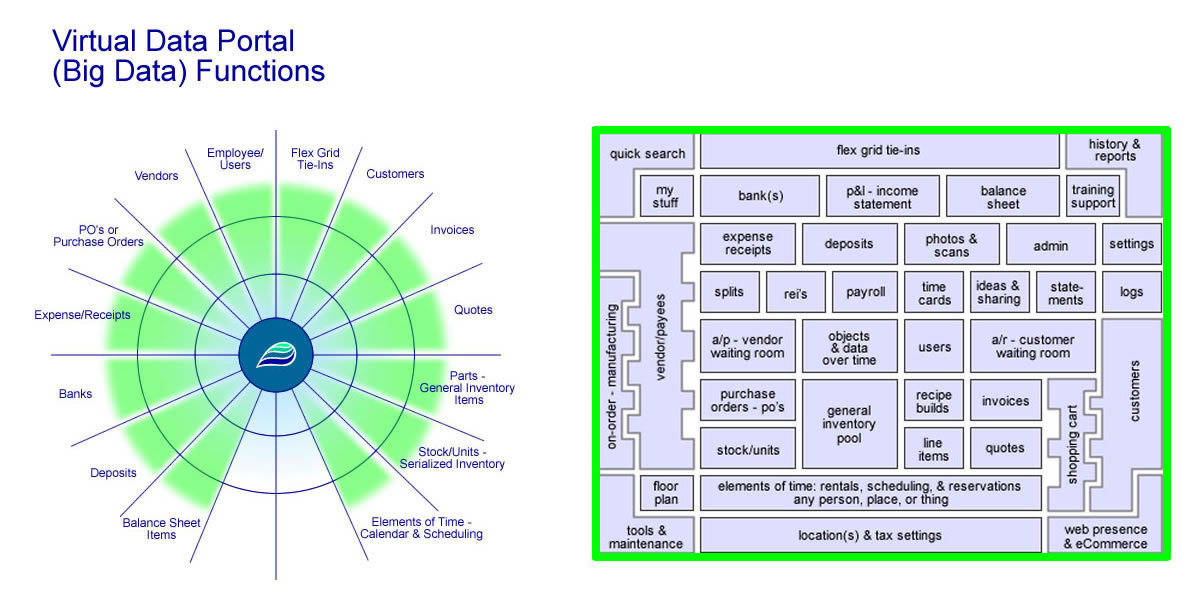
4 - Meet The Players   This is an alphabetic list of some of the different players within the system. There are quite a few of them. As a note, we have two main interfaces. One is what we call the interactive map, which has a number of rooms and locations, setup in virtual areas or parts of the system. Another one of the main layouts is what we call that the GPS core. Both of these combined show a number of the key players and what goes on inside the system. In order so that this page does not get super huge, we are going to link out specifically to the different areas based on the links above.

Here are the help files for the interactive map and the GPS core, which show a number of the different players in the system. If you want to know more about the different players, those are the best places to start. They show a number of the different players and how they interact with each other.

Small graphic to show the core and the interactive map. Click to see more of what we do and offer!